Who owns your clinic's domain name, and how to check
The short answer
- Nominet's free lookup shows your domain's registrar, its expiry date and where its settings live, but it may hide who owns it.
- So ask the registrar whose name the domain is in, and make sure it's yours or your clinic's, with a login you control.
- If someone else holds a .co.uk or .uk domain, changing the owner is a Registrant Transfer that they or their registrar start. Nominet's own service costs £10 plus VAT.
- Up to four providers sit behind a domain: registrar, DNS, website host and email. Find out who each one is before any website change.
- A new website won't fix a domain ownership or access problem, so settle that first.
You can see where your clinic’s domain is registered in a minute: type it into Nominet’s free lookup. It shows the company that manages it (the registrar), when it expires and where its settings live. It may not show who owns it, because the owner’s details can be hidden for privacy.
Why it matters more than the website
Your website address runs on your domain, and if you use an email address like [email protected], so does your email. A website can always be rebuilt. A domain you can’t get back can’t.
I’ve seen that happen more than once. Professional Sports Physio, a client of mine, couldn’t get their old domain back, so they had to get a new domain entirely. Luckily the .com was available. Another business I consulted with couldn’t get its domain back either, and wasn’t sure how to go forward with a new one, so I didn’t end up building their site.
That’s why I’d check this before you spend anything on a new website.
How to look it up
- Go to nominet.uk/lookup.
- Type your full domain (for example yourclinic.co.uk).
- Press Lookup.
Start here for .co.uk and .uk domains.
Here’s the lookup for my own domain:
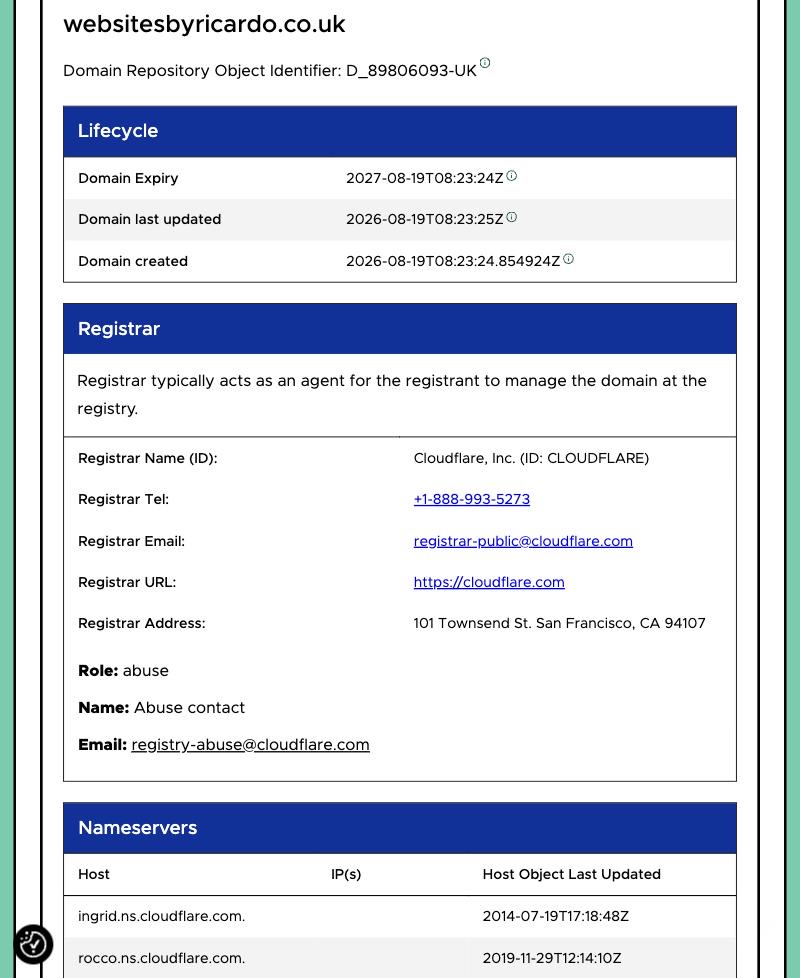
It says my domain expires in August 2027, that Cloudflare is the registrar, and that the nameservers are Cloudflare’s. Further down, the registrant section says “redacted for privacy”.
What the lookup tells you, and what it doesn’t
- Domain expiry: the date it has to be renewed by. Find out who renews it, and whether it renews automatically.
- Registrar: the company that manages the domain for its owner. That’s who you contact.
- Nameservers: where the domain’s settings (its DNS) are kept, including the ones that point it at your website and your email.
- Registrant: the owner. Yours may be hidden, as mine is.
Three things to have in your own hands
- The domain registered in your name, or your company’s. Not your web designer’s, and not a former employee’s.
- A login to the registrar’s account that you control, with an email address you’ll still have in five years.
- The renewal date, and who pays for it.
These are the domain details to settle before changing web designer. Also make sure you can get into your website, your DNS settings and your email, and check what your current agreement says.
If someone else holds it
For a .co.uk or .uk domain, moving it to a new owner is called a Registrant Transfer.
- Ask the registrar first. Nominet says an accredited registrar may be able to handle it for you, so ask about its process and charges.
- If not, the current owner starts it in their Nominet Online Services account, logging in with the email address on the registration.
- Nominet’s own transfer service costs £10 plus VAT, and the new owner has five days to accept.
- If the domain is in your name but you’ve lost access to the email on it, ask your registrar to update the email address first. If it can’t, Nominet’s identity re-establishment service costs £10 plus VAT.
- If ownership is disputed, get independent legal advice about your options. Nominet publishes guidance on its Dispute Resolution Service for .uk names, which looks at rights in a name and abusive registration. I can’t tell you whether your situation qualifies.
- Moving a domain to a different registrar while keeping it in your name is a separate process, which Nominet’s help pages cover on their own.
Who hosts your website and email
The domain is only the address. Four different things can sit behind it, sometimes with four different companies: the registrar, the DNS provider (the nameservers), the website host and the email provider.
To find out who does what:
- Look through invoices and welcome emails for hosting, domain and email, and note the company on each.
- Ask your current web designer or provider to confirm all four in writing, and which account controls each one.
- Check you can log in to each of those accounts yourself, or know who can.
Before you change web designer
A new website won’t fix a domain ownership or access problem, so settle that first. Before I switch any site over, I check the domain and email set-up, agree which pages to keep or redirect, test the route into the booking system, and agree a way back. If you then choose a relaunch with me, your domain stays registered to you. There’s more on how a website relaunch works, and on the Professional Sports Physio project.
If you’d like to see what your website could look like first, I’ll design it for free: your homepage live on a private link, your main pages designed, the route into your booking system, and a PDF to keep. Building and launching the finished site is a fixed £1,500, and there’s no obligation to go ahead.